
Imagine publishing research papers, collaborating internationally, changing institutions, and building your academic career, then having to prove that all those publications belong to you, especially when another researcher has a similar name.
This is where ORCID helps. ORCID ID is a researcher identifier which connects you to your scholarly work and professional activities. An ORCID ID does not change like your name would through your research career.
The good news is that ORCID registration is free and getting an ORCID ID takes just under a minute. However, registration is only the beginning. To get real value, you should verify your account, complete your ORCID profile, and connect your publications.
So, if you’re wondering how to create ORCID ID, this guide will walk you through the complete step by step process.
What Is ORCID ID?
ORCID is the abbreviation of “Open Researcher and Contributor ID”. ORCID is basically an identification system which guarantees uniqueness of the researcher or contributor in respect to his/her research and affiliation.
In other words, ORCID ID is your unique ID number throughout your research career.
ORCID ID is actually a 16-digit number. The most important point here is that the ID number is yours only and does not belong to your institution or any other research organization or journal that you publish in.
The name of the researcher changes in the course of his/her research career. For instance:
- A. Sharma
- Ananya Sharma
- Ananya S. Sharma
- A. S. Sharma
However, ORCID will ensure that these differences are linked to the same person if entered into your ORCID record. It would also still be yours even if you switch institutions, places, fields of study, and sources of funds.
It is also important for you to understand the difference between ORCID iD and ORCID record. The former is nothing but an identifier.
The ORCID record is the place where everything related to the identifier is placed. Everything from your name and affiliation, publications, education, sources of funding, professional activities, and anything else related to research can be included in the ORCID record.
So, in a simple formula:
- ORCID iD = your unique researcher identifier
- ORCID record = information connected to your research identity
Why Do Researchers Need an ORCID ID?
Academics already have profiles on university websites, Google Scholar profiles, journal websites, and so on. Why would researchers require yet another identifier?
The explanation is straightforward: an ORCID identifier creates a unique research identifier linking you to your research contributions across various platforms.
1. Helps Differentiate You from Other Similar Names
In an academic field, many researchers can have the same name or even use their names in various formats. With an ORCID, it is easy for publishers, institutions, and sponsors to differentiate your research contributions.
2. Links Your Research Outputs
With your ORCID, it will be easier to link all your research contributions together.
3. Stays with You Throughout Your Career
Universities, employers, research areas, and even name formats can change. Your ORCID iD remains the same, providing a consistent research identity.
4. Reduces Repetitive Data Entry
ORCID can connect with research systems, allowing information to be shared and reused where supported. In simple terms: enter once, reuse often.
5. Improves Research Discoverability
The linking of ORCID iD to one’s publications and affiliations facilitates easier identification and discovery of your work by various research systems and researchers.
How to Create ORCID ID: Step-by-Step Guide
Now comes the part most researchers are looking for: how to create ORCID ID.
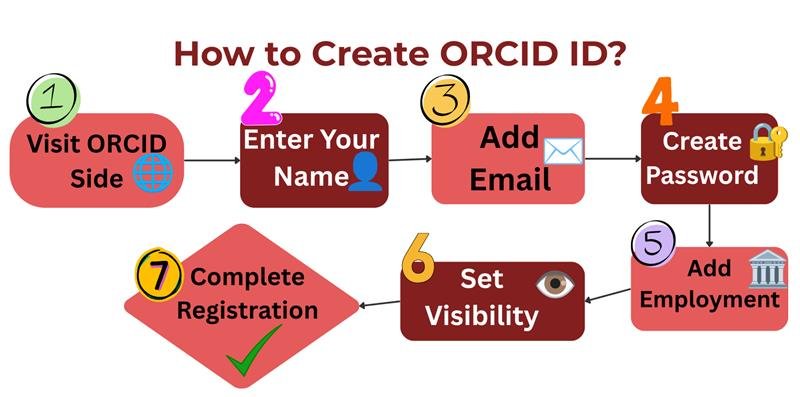
It is a simple process, but every step plays its role in creating a credible research identity. Let’s go through this process step by step with visuals.
Step 1: Visit the Official ORCID Registration Page
Start with the official ORCID website. There are no costs involved in the process, and no university or research institution affiliation is required.
Visit the official ORCID registration page.
Select the choice to make an ORCID iD account.
Please be sure that you are making this registration on the actual ORCID website.
No institutional affiliation? No problem. ORCID registration is open to individual researchers.
Step 2: Enter Your Name
Your name is the starting point of your research identity. Use the version of your name you commonly use in your academic or professional work.
Enter your given name.
Add your family name if applicable.
Add other name variations to your ORCID record later if you publish under different formats.
For example, you might publish as Priya R. Mehta in one paper and Priya Mehta in another.
Adding relevant variations can help make your research identity easier to distinguish.
Step 3: Add Your Email Address
Your email helps you access and manage your ORCID account, so choose an address you expect to keep using.
Enter your primary email address.
Add a secondary or backup email when possible.
Use an active email address that you can access regularly.
A personal backup email can be particularly useful if your university email becomes inactive after changing institutions.
That small step can save you from an unnecessary access headache later.
Step 4: Create a Secure Password
Due to the fact that the data contained in your ORCID profile is of great significance, it will be best to protect the data by creating a password for your account.
The password should comply with ORCID's policy.
It should not be one that can easily be guessed.
Safeguard your credentials.
It takes just a minute to create a good password, and then it protects your research identity for many years ahead.
Step 5: Add Your Current Employment
ORCID may suggest your organization when you use an institutional email address. You can add your affiliation now or complete it later.
Select your organization or institution.
Add your department or role where relevant.
Include your employment start date if applicable.
This step is optional, so you can skip it during registration and update your affiliation later.
Your ORCID record can grow with your academic career as your affiliations change.
Step 6: Choose Your Visibility Settings
This is something that deserves some attention.
ORCID allows you to set the visibility of the data you input into your record yourself.
Set the level of visibility for your data.
Study the choices before you finish registration.
Bear in mind that visibility settings can be altered afterwards.
Everyone and Trusted Parties should be chosen by default as recommended by ORCID as these visibility levels can assist in facilitating information sharing between systems integrated with ORCID.
In other words, do not just pass through this section; select the most convenient option.
Step 7: Accept the Terms and Complete Registration
You're almost there. Review the required information, complete the verification step, and submit your registration.
Review the privacy and terms information.
Complete the human verification step.
Select Complete registration.
Once completed, ORCID will take you to your new record. And that's it, your ORCID registration is complete.
But remember, creating your ORCID ID is only the first step. The next important task is to verify your email and start building your ORCID profile.
Verify Your Email After ORCID Registration
Since you have already registered for ORCID successfully, login to your inbox and look at the ORCID welcome mail that has been sent to you.
The next thing that you must do is verify your email through the link provided.
What’s the Significance of Doing So?
This is because this process will ensure that you actually have an account for that particular email address as provided in your ORCID profile.
If in any way you do not receive the verification email, then the following actions can be taken:
Spam folder
Junk folder
Promotions folder
Other filtered inbox categories
This is a small step, but skipping it can limit what you can do with your new ORCID record.
What Should You Do After Verification?
Once your email is verified, take a few minutes to strengthen your ORCID profile.
Consider adding:
Your current affiliation:
Add your university, organization, department, or other relevant affiliation.
Other versions of your name:
Add name variations that you have used in academic publications.
Additional email addresses:
Add other active email addresses so you have more than one way to access your account.
Your research works:
Connect your publications and other research outputs to your record.
ORCID recommends importing works from supported services when possible rather than relying only on manual entry. This is where your ORCID account starts becoming genuinely useful.
What Are the Benefits of ORCID ID for Researchers?
The benefits of ORCID ID go beyond simply having another academic profile. It can make your research identity easier to manage, connect, and recognize.
Here are the key benefits at a glance:
| Benefit | How It Helps Researchers |
|---|---|
| Unique Research Identity | Distinguishes you from researchers with similar or identical names. |
| Persistent Identification | Keeps your research identity connected to you even when your institution, location, or name format changes. |
| Better Publication Attribution | Helps correctly connect your research papers and other outputs with your identity. |
| Less Repetitive Work | Allows connected research systems to share and reuse information where supported, reducing repeated data entry. |
| Easier Research Management | Brings publications, affiliations, education, funding, and other professional activities together in one record. |
| Greater Discoverability | Helps research systems and other researchers identify and discover your work more easily. |
For researchers building a long-term academic career, an ORCID iD can become a simple but valuable part of managing their research identity.
Common Mistakes to Avoid During ORCID Registration
ORCID registration is easy, but these small mistakes can cause trouble later.
- Creating a Second ORCID iD
Forgot your login? Recover your existing account instead of creating a new one. - Using Only Your University Email
Use another personal or secondary email address to prevent any loss of access after shifting universities. - Keeping Your ORCID Profile Blank
Populate your record with your publications, organizations you work for, and your names. - Neglecting Your Privacy Settings
Find out who can see your details and choose accordingly your privacy settings. - Not Using Your ORCID ID
Use your ORCID ID while submitting papers to journals and collaborating with publishers.
Final Thoughts
Creating an ORCID iD is fast and easy, but the benefits of having one can persist throughout your entire research life. This identifier differentiates your research from those with the same name and links all your research outputs together.
When thinking of how to create ORCID ID, there isn’t much difficulty. Simply register for an account, verify your email, and maintain your ORCID record up-to-date with your research data.
Do not view ORCID as just any other academic profile. Rather, treat it as your identifier for life-long research activity.
Frequently Asked Questions
Is there a charge for registration through ORCID?
No. Researchers can get their ORCID ID free through the ORCID Registry.
Is there any requirement of having any association with any university for having an ORCID ID?
By no means, there is no such requirement of having any association with any university for getting an ORCID ID.
How long would it take me to register on ORCID?
According to the ORCID website, it will take less than one minute
Can I add my research papers to my ORCID profile?
Yes, you may link or import your publications or other research-related material in your ORCID account. ORCID recommends that one make use of import services wherever possible.
Can I create another ORCID ID if I forget my existing one?
It is better to recover your existing ORCID iD rather than create another account. ORCID provides recovery options using the email addresses associated with your record.